Event planning template

About the event planning template
Planning an upcoming event? It’s a whirlwind of budgets, speakers, vendors, timelines, and last-minute changes. Airtable’s event planning template brings it all together in one powerful workspace—so you can manage every detail with clarity and confidence.
From scheduling sessions and assigning tasks to tracking budgets and collaborating in real time, this free event planning template keeps everything on track. With built-in timeline, calendar, and checklist views—plus AI-powered features—you can plan smarter, move faster, and deliver events that stand out.
What is an event planner template?
An event planning template is a structured framework that helps you manage every stage of an event—from early planning to execution and post-event follow-up. It acts as both a checklist and a roadmap, keeping timelines, budgets, vendors, tasks, and guest lists organized in one place so nothing slips through the cracks.
Airtable’s event checklist template goes further with AI-powered features that help you automate busywork, track progress, and adapt in real time, all within a customizable, all-in-one workspace.
What are the benefits of using Airtable’s template for event planning?
Planning an event shouldn’t feel like herding cats. Airtable’s template gives you the tools to stay organized, move fast, and plan events that people remember. Start planning with a ready-made structure that covers every stage — no blank-page problem, no scrambling to remember what you missed last time. Built-in teamwork features let everyone contribute in real time, from early outreach to post-event wrap-up.
- Keep everything in one place: Budgets, schedules, vendors, guest lists, and your event planning checklist—no more tab-hopping or chasing down info.
- Collaborate in real time: Work together without the back-and-forth. Everyone stays in sync, instantly.
- Visualize your plan your way: Toggle between a calendar or timeline template to get a clear picture of your event schedule.
- Automate the busywork: Let AI handle reminders, status updates, and repetitive tasks so you don’t have to.
- Scale effortlessly: Whether it's a small team offsite or a multi-day conference, the template flexes to fit.
- Connect your favorite tools: Integrate Slack, Gmail, Jira, and more to keep updates flowing without manual work.
What event details can you manage with Airtable's event planning template?
From budgets to speaker bios—here’s what our event planning template covers. Use the kanban view to move tasks through your event schedule by stage, which is ideal for surfacing what's blocked and what's ready to move. It helps track staffing and task ownership in one place, so you always know who's responsible for what as your event date approaches.
- Event tasks: Stay on top of logistics with a clear view of every task and their due dates. See which are overdue, on track, or completed, and assign owners to keep things moving from kickoff to wrap-up.
- Budget planning: Plan future budgets or track real-time spending across categories. Roll-up custom fields show whether you’re under or over budget at a glance—with visual breakdowns to guide smarter decisions. Track metrics like per-attendee spend, session attendance, and engagement scores alongside your budget — so you have the data to improve pricing and resourcing for the next event.
- Speakers: Manage speaker bios, session assignments, and contact details in one place. Use built-in AI to auto-generate speaker introductions, summarize LinkedIn profiles, and draft welcome scripts—so you’re always prepared.
- Event planning calendar and timeline: Visual planning tools to map out sessions and key milestones.
- Sessions, program, and agenda: Create and customize multiple events, then break each one into sessions with start and end times, owners, and agendas. Visualize everything in a calendar view to spot overlaps or gaps before they happen.
- Attendees: Add attendees manually or upload a CSV for large groups. Customize fields to track contact info, status, dietary preferences, and more.
- Event venue and logistics: Centralize location info, availability, capacity, transportation, and registration plans.
- Marketing and promotion: Organize your promotional strategy and to-do list, from email campaigns to social media assets.
- Post-event evaluation: Measure event success by collecting ratings and comments per session with built-in forms. Then use AI to analyze sentiment, surface insights, and improve your next event with real attendee feedback.
Types of event planning templates
From basic to built-for-anything: here’s how different event planning templates compare.
- Checklist worksheets: A straightforward list of tasks to help you track what needs to get done—ideal for quick planning or small events.
- Timelines: A visual layout of your event schedule, helping you see how sessions, tasks, and deadlines align over time.
- Spreadsheets: Useful for budgeting and basic tracking, but quickly become clunky for larger events—lacking real-time updates, collaboration, or dynamic views.
- Event management software: Tools like Airtable offer customizable templates, real-time collaboration, calendar and Gantt views, automations, and AI features—everything you need to plan smarter and scale with ease.
How to use the event management template
Make the most of your template with these quick tips.
1. Start with a pre-built dashboard
Duplicate the event plan sample to unlock a ready-made dashboard that tracks your budgets, sessions, speakers, and tasks. Click into any item to customize event details in seconds.
2. Plan every part of your event
Build daily schedules, session agendas, invites, and promotions—all in one place. Use calendar or timeline views to map out your event, assign owners, and set deadlines with ease.
3. Let AI do the heavy lifting
Automatically generate speaker bios, social promotion copy, session intro scripts, and post-event recaps—so you can focus on strategy, not busywork.
4. Collaborate without the chaos
Manage venues and vendors, loop in stakeholders with updates and check-ins, and centralize enablement resources like travel details and key internal links.
5. Gather feedback and level up
Send out post-event feedback forms and let AI analyze sentiment to uncover what worked—and what to improve for next time.
12 free event planning templates
Looking for more event planning templates? These ready-to-use templates help you plan every detail—so nothing gets missed.
1. Event budget template

Built for event planners who need to forecast, track, and control event expenses with precision.
2. Event marketing template

Perfect for marketing teams looking to plan campaigns, coordinate channels, and drive registrations before the big day.
3. Event contacts management template

Designed to help organizers keep speaker, vendor, and guest contact details organized and accessible throughout the event planning process.
4. Virtual events tracker template

Tailored for online events like webinars—track links, sessions, hosts, and attendee logistics in one place.
5. Event registration form template
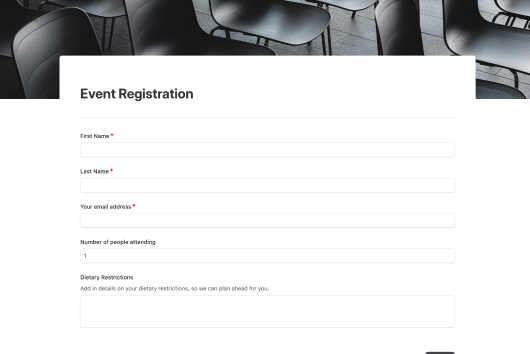
Great for collecting attendee info and RSVPs through customizable, shareable forms with no coding required.
6. Event invitation maker template

Ideal for team members who want to create, send, and manage personalized event invitations quickly and professionally.
7. Event catering template

Built to plan event meals—track menus, dietary preferences, vendor contacts, and delivery timelines.
8. Event volunteer template

Perfect for assigning roles, managing schedules, and keeping your volunteer team organized and informed.
9. Event planning content calendar template

Best for content and social teams—plan, schedule, and align all pre-event communications in one calendar view.
10. Vendor management portal template

Designed for streamlining vendor relationships—track contracts, deliverables, and points of contact across vendors.
11. Event project planning template

Ideal for event project management—breaking down complex events into actionable tasks with clear ownership, timelines, and dependencies.
12. Event Gantt chart

Perfect for visualizing your entire event timeline—map tasks, deadlines, and dependencies across teams to keep everything moving on schedule.
Try these Claude prompts with the event planning template
If you connect our event planning template to Claude using the Claude + Airtable MCP, you can ask Claude to take direct action across your events, sessions, tasks, and expenses without touching a single field manually. Here are some prompts you can try:
- I'm planning a new event called [EVENT NAME] on [DATE]. Create the event record, add these sessions: [PASTE LIST], and generate a task list covering logistics, creative assets, and speaker confirmation with due dates working backward from the event date.
- Here's my speaker lineup for [EVENT NAME]: [PASTE LIST]. Create a record for each speaker, assign them to their session, and draft an AI-generated intro for each one based on their LinkedIn and role.
- Pull all tasks across my events where the status is overdue or the due date is within the next 7 days. Summarize what's at risk by event and suggest which should be reprioritized to high.
- The [EVENT NAME] is over. Here's the attendee feedback: [PASTE FEEDBACK]. Log each response to the feedback table tied to the right session, then generate a summary of overall sentiment, what went well, and what to improve.
Improve event management and planning with Airtable
Plan a successful event with Airtable. Centralize every detail—agendas, budgets, speakers, tasks—in one flexible workspace that keeps your whole team in sync. Automate busywork, generate content with AI, and push real-time updates to tools like Slack and Gmail. With smart views, built-in integrations with tools like Microsoft Teams and Google Sheets, and customizable workflows, you’ll streamline planning, adapt on the fly, and keep every event right on track.
Frequently asked questions
How can I customize the event template?
Airtable’s event planning template is fully customizable to fit your workflow—not the other way around. Switch between views, edit fields, fine-tune AI prompts, and connect tools like Slack and Gmail to automate updates and keep your team aligned.
What types of events can you manage with an event planning template?
Whether you're planning a large-scale conference or an intimate gathering, Airtable’s event planning template is built to handle it all. It’s flexible enough to support everything from corporate events and trade shows to weddings, team retreats, virtual events, and more.
How do I use an event planning template to plan an event?
Start by customizing the template with key event details—like dates, venues, sessions, and tasks—then assign owners, set deadlines, and track progress in real time. Use built-in views and AI features to stay organized, automate updates, and keep your entire team aligned from kickoff to wrap-up.
How are Airtable event planning templates different from Canva and Excel templates?
Unlike static templates in Excel or Canva, Airtable templates are dynamic, interactive workspaces designed for real-time collaboration and execution. You can assign tasks, track progress, switch views, and even use AI to generate content—making it a living system that adapts to your workflow and scales with your event. Connect docs, apps, and your existing tool stack through Airtable's integrations — everything your team already uses can flow into one workspace.
Discover more event planning resources:
Other Project Management templates


Not finding a template that fits your needs?
Build it with AI